
Want to GET TRCN CERTIFICATE? The exam is first step and registration is ongoing nationwide.
See the correct procedure for TRCN exam registration as well as your eligibility and how to register for TRCN online this year before deadline.
- ALSO SEE: HOW TO PASS TRCN EXAM WITHOUT REWRITING
🔔 This is for teachers in Nigeria. If you’re in UK, US, Canada or anywhere abroad, CLICK HERE TO SEE HOW TO REGISTER FOR TRCN ABROAD
Can I write TRCN exam?
You’re eligible to register for TRCN online if you have an NCE or a degree in education.
If your degree is NOT in education, you need to possess either PGDE or PDE to be eligible for TRCN registration online.
What are the requirements for TRCN exam registration?
Ensure these documents are ready with correct information to avoid certificate or licence delays.
Scan or snap and save each document as you will upload them during your online registration.
1. School certificate
Your NCE, Bachelor’s degree, Masters or PhD certificate.
If your certificate is from outside Nigeria, you’d have to get a “Regularized Certificate” by Federal Ministry of Education verifying that such certificate corresponds with Nigeria’s standard.
2. Teaching qualification
If your verified school certificate is in education, you’re qualified to register for TRCN online.
Otherwise, obtain either PGDE or PDE in addition to your school certificate.
3. Means of identification
NIN slip/card, Voter’s card or International passport.
4. Signature
Put your signature on a paper, then scan or snap it and save on your device.
5. Work history
Get this details offhand or from your CV.
6. Affidavit (not for all)
Only when there are discrepancies in the spelling or arrangement of your name across your documents.
Marriage certificate will also be required from applicants whose names changed after marriage.
See how to register for TRCN online now
Once you have all the above documents saved on your device, proceed with your TRCN registration online as follows.
Online registration steps
1. Create profile on TRCN portal
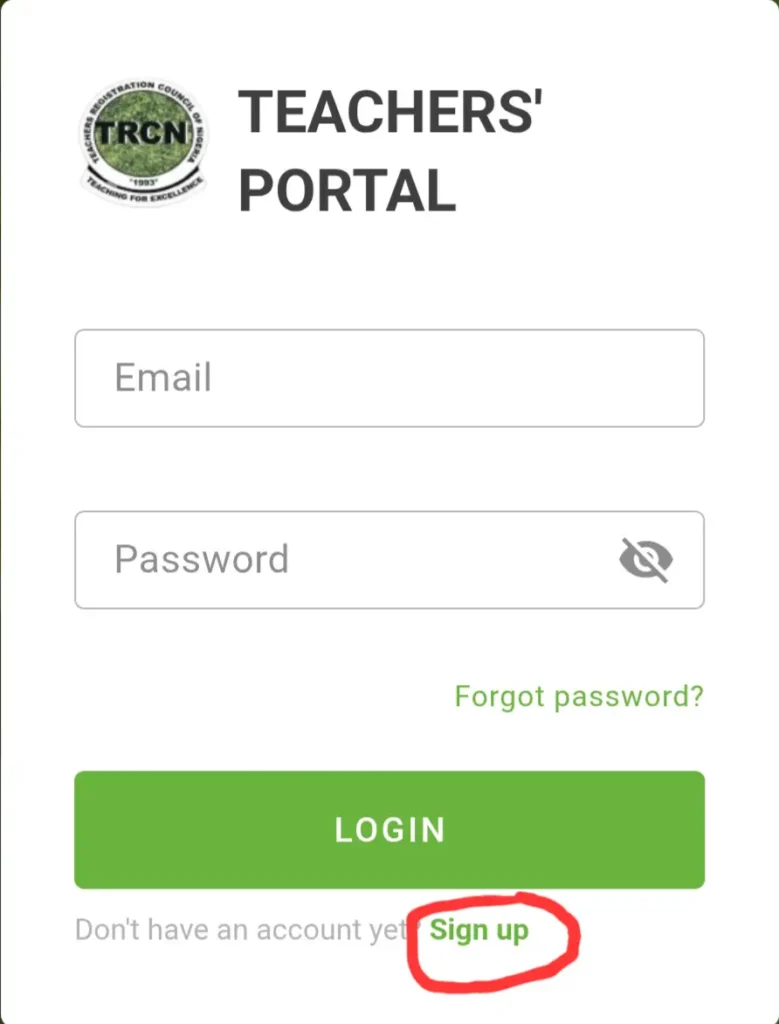
— Visit TRCN portal
Ensure you read these registration steps here before you VISIT TRCN PORTAL to avoid mistakes.
- Click “SIGN UP”
— Verify your NIN
Enter your NIN (11–digits) and your date of birth in (DD/MM/YYYY) format.
- Click “VERIFY”
— Confirm your details
Ensure the details are correct because that’s how they will be used for your TRCN registration online.
If any detail is incorrect, edit it at the NIN office (not on the TRCN page).
But if all correct?
- Click “CONTINUE”
— Update your personal details
Fill the boxes with your state of origin, residential address, phone number, etc.
- Click “NEXT”
— Upload your Identification details
Upload your ID card (NIN slip, Voter’s card, International passport) and your signature-on-paper that you have scanned or snapped.
- Click “SUBMIT” then “NEXT”
— Update work experience
Select that you have work experience if you are teaching or have taught before.
- Click “NEXT”
— Create work experience
Fill the boxes with the organisation name and sector, your job role and responsibilities, start date, end date, etc.
- Click “SAVE” then “NEXT”
— Verify your qualification(s)
Enter your academic qualification details and upload the certificate that you snapped or scanned earlier.
Select only from the drop-down of institution, course, year, etc. then upload your certificate.
- Click “VERIFY”
🫸 Wait about 1–2 weeks for TRCN to verify your school certificate(s) uploaded before step (2).
2. Fill the registration form
— Start the exam registration
Enter your profile, click the menu icon at the top left side of your screen and click on “EXAMINATION”.
Click on “EXAM REGISTRATION” then “REGISTER”.
— Select the exam you want to write
- The 1st option (PQE) is for teachers in Nigeria with teaching certificate.
- The 2nd option (iPQE) is for Nigerian teachers living abroad with teaching certificate.
- The 3rd (PQEi) is for final-year education students in Nigeria.
Select the option that applies to you and click “NEXT”.
🔔 This guide is for (PQE or PQEi). If you’re abroad, CLICK HERE TO SEE HOW TO REGISTER FOR (iPQE)
— Choose exam batch and state
TRCN exam is written twice a year in Nigeria — 1st batch in May and 2nd in November.
Select the available exam batch and your state of residence or the state where you prefer to write the exam in.
- Click “NEXT”
— Make payment
Here you’ll see your TRCN exam registration bio and a button to pay for the exam.
Click the button to get a payment invoice.
- Click “MAKE PAYMENT”
Follow the prompts to complete your payment.
— Print receipt and await exam
After successful payment, print your receipt and keep checking the portal for your exam date while you prepare to pass.
3. Prepare to pass TRCN exam
— Study the TRCN syllabus
Get the NEW TRCN SYLLABUS and study according to the areas of concentration on each topic in that syllabus.
— Use study materials
All TRCN questions are only on education courses like Pedagogy, Literacy, Numeracy, ICT and Safeguarding.
Get legit materials on these topics and study them well, especially the first 3.
— Get TRCN past questions
Past questions expose you to TRCN exam format and commonly asked questions.
Purchase our TRCN past questions to also get study materials and free access to practice TRCN CBT on your phone 🤳
Additional information
Visit any of the TRCN OFFICES IN NIGERIA for assistance with this registration process or subsequent enquiry.
Ensure to exchange contacts with the TRCN officer if you visit the office.
Also contact our CYBER CAFÉ to register you faster and without mistakes.
GOOD LUCK.
Was this post helpful or do you have other enquiry on how to register for TRCN online? Let us know in the comments.



Leave a Reply